Answers to common questions and quick walkthroughs. Deal labels and suggestions are based only on your own purchase history from uploaded receipts—not on any retailer or brand.
How to upload receipts
Watch this short walkthrough to add receipts from Kroger (or other stores) so the app can track your purchases and personalize suggestions.
Ignore lets you exclude unusual buys from your analytics without deleting receipt data. Use the eye icon on All Items or in an item's purchase history.
Ignore one purchase (item detail)
Open an item and use the eye icon on a row in Purchase history when a single trip should not count toward that item's averages. For example, if Kroger gave you a free item reward ($0.00) on one receipt, ignoring that purchase keeps your average price realistic so deal labels are not thrown off by one free line. Ignored purchases stay visible but are excluded from average price, trend, and related stats. Tap the eye again to include it. You cannot ignore the only purchase left on an item.
Ignore an entire item (All Items)
On All Items, use the eye icon on a row when you bought something once and do not want it in your regular shopping picture—for example a one-time gift basket or party supplies. The item leaves your default list and is excluded from item-level analytics. Use the Ignored filter chip (like Favorites) to see ignored items and un-ignore them later.
No. GrocerEaze is an independent app. We are not owned by or partnered with Kroger or any retailer or brand. We use Kroger login so you can add items to your Kroger cart and we show current Kroger prices when available—but all deal labels (Great Buy, Good Buy, Fair Price, Wait), Favorites suggestions, and analytics are based only on your own uploaded receipts and purchase history. We don't use any retailer or brand criteria or promotions to evaluate your purchases.
Tap the heart icon on any item row to add or remove it from Favorites. On All Items, use the Favorites filter chip to see only favorited items—combined with search, sort, and the Good Buy / Fair Price / Wait chips.
Suggested favorites live in Settings. Add or dismiss suggestions with one tap based on your purchase history.
Tap Add to Cart on any item (All Items or item detail) to send that item to your Kroger cart. Review quantities, substitutions, and checkout on Kroger.com before placing your order.
Suggestions are based purely on your purchase history—how often and how recently you bought things. Nothing about calories, nutrition, or lifestyle. They help keep your Favorites list aligned with what you actually buy.
Auto-balanced criteria
Suggestions automatically balance add vs. remove counts using 7 criteria levels. The middle level (default) aims for a handful of each; if imbalanced, the system picks the level that best evens them out.
Add to Favorites (at the default level): Not in your favorites yet, at least 3 purchases in the last 12 weeks, last purchase within 56 days (8 weeks), and regularity score ≥ 0.3.
Remove from Favorites (at the default level): In your favorites, last purchase at least 60 days ago, and either no purchases in the 12-week window with last purchase over 84 days ago, or regularity score below 0.18. Items with a purchase in the last 60 days are never suggested for removal.
Regularity score blends purchase count (45%), recency (35%), and consistency of your buying pattern (20%). At other balance levels the thresholds are stricter or looser.We compare the current Kroger price (when available) to your historical average for that item—calculated from your uploaded receipts. Each item gets one label:
| Label | Criteria |
|---|---|
Great Buy | 20% or more below your average |
Good Buy | 8% to less than 20% below your average |
Fair Price | Between 2% above and 8% below your average |
Wait | More than 2% above your average |
The ranges do not overlap, so each item gets one clear recommendation.
N/A appears when live Kroger pricing is unavailable for that item right now, or when matching product data could not be resolved. Your historical receipt data is still preserved and used in analytics.
You can upload receipts from Kroger or other stores. Below are steps to download Kroger receipts as PDFs:
1. Go to "My Purchases"
Click on your profile name in the top right, then select "My Purchases".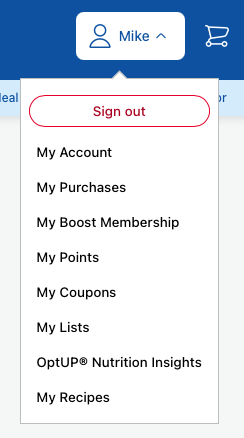
2. Select an order
Click on any order from your purchase history.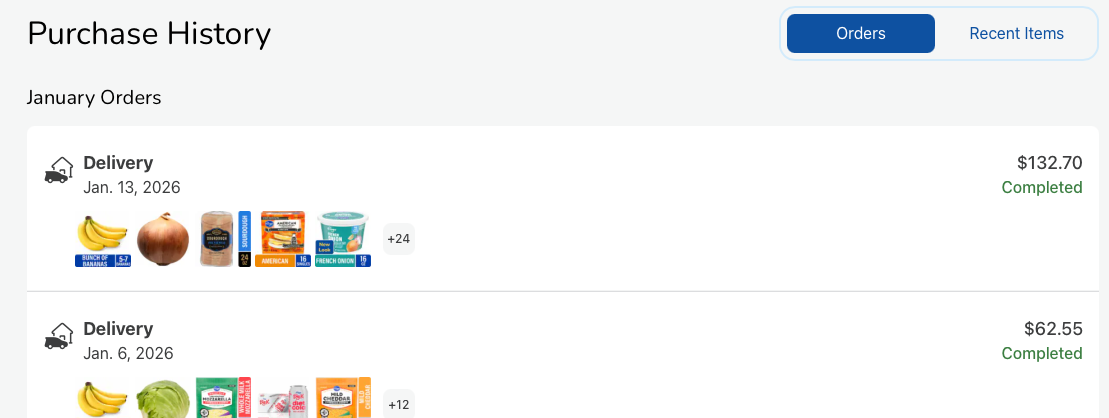
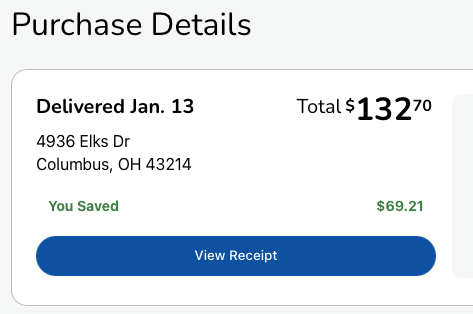
3. View Receipt and Print
Click "View Receipt" and then use the "Print" button to save as PDF.